
Chat with us on WhatsApp!
{ "@context": "https://schema.org", "@graph": [ { "@type": "BlogPosting", "@id": "https://www.topicon.hk/blog-detail/en/vehicle-dock-ignition-switch-crd-bkt-matrix.html#article", "mainEntityOfPage": { "@type": "WebPage", "@id": "https://www.topicon.hk/blog-detail/en/vehicle-dock-ignition-switch-crd-bkt-matrix.html" }, "headline": "Vehicle Dock Ignition Switch: CRD & BKT Model Matrix", "description": "Which TOPICON dock has an ignition switch: CRD880/865/1065 external, BKT865 none, BKT865-LAN/CRD864 and CRD680 internal, CRD665 no ignition line.", "image": [ "https://www.topicon.hk/file/upload/2026/11/vehicle-dock-ignition-switch.webp" ], "datePublished": "2026-11-17", "dateModified": "2026-11-17", "author": { "@type": "Organization", "name": "TOPICON", "url": "https://www.topicon.hk/" }, "publisher": { "@type": "Organization", "name": "TOPICON", "url": "https://www.topicon.hk/", "logo": { "@type": "ImageObject", "url": "https://www.topicon.hk/static/images/logo.png" } }, "articleSection": "Deployment Guides", "keywords": "vehicle dock ignition switch, CRD865 ignition, BKT865 switch, CRD665 ignition line, vehicle tablet power", "inLanguage": "en" }, { "@type": "BreadcrumbList", "@id": "https://www.topicon.hk/blog-detail/en/vehicle-dock-ignition-switch-crd-bkt-matrix.html#breadcrumb", "itemListElement": [ { "@type": "ListItem", "position": 1, "name": "Home", "item": "https://www.topicon.hk/" }, { "@type": "ListItem", "position": 2, "name": "Resources", "item": "https://www.topicon.hk/blog/" }, { "@type": "ListItem", "position": 3, "name": "Deployment Guides", "item": "https://www.topicon.hk/blog-list/deployment-guides/" }, { "@type": "ListItem", "position": 4, "name": "Vehicle Dock Ignition Switch: CRD & BKT Model Matrix" } ] }, { "@type": "FAQPage", "@id": "https://www.topicon.hk/blog-detail/en/vehicle-dock-ignition-switch-crd-bkt-matrix.html#faq", "mainEntity": [ { "@type": "Question", "name": "Can I add an ignition switch to BKT865?", "acceptedAnswer": { "@type": "Answer", "text": "No. BKT865 has no switch and no ignition input. Use an external relay or choose a CRD dock that supports ignition control." } }, { "@type": "Question", "name": "Why does my CRD864 stay on after the key is off?", "acceptedAnswer": { "@type": "Answer", "text": "CRD864 ships with an internal switch whose default is independent. It can be configured to follow ignition, but that is a factory or configuration change, not a wiring fix." } }, { "@type": "Question", "name": "Does the tablet model change the ignition behaviour?", "acceptedAnswer": { "@type": "Answer", "text": "No. The switch and its default behaviour are properties of the dock or bracket, not the tablet. The tablet only reacts to power." } }, { "@type": "Question", "name": "What is the input voltage range?", "acceptedAnswer": { "@type": "Answer", "text": "The tablet and dock input is 9–36V DC. Configurations with a camera start at 11V. See the power tap point and DC-DC sizing guide for cranking and converter details." } } ] } ] }
Vehicle Dock Ignition Switch: CRD & BKT Model Matrix
2026-11-17
DEPLOYMENT GUIDEIgnition SwitchDock Matrix

Vehicle Dock Ignition Switch: CRD & BKT Model Matrix

Most ignition problems in a vehicle deployment are not tablet problems. The tablet does what the dock tells it to do — and whether the dock has a switch, where that switch sits, and what its default behaviour is depends on the dock SKU, not the tablet model. This guide maps the behaviour across the current CRD and BKT docks, so you can specify the right one before the wiring plan is written.

Reviewed by the TOPICON hardware team. Specifications current as of November 2026.
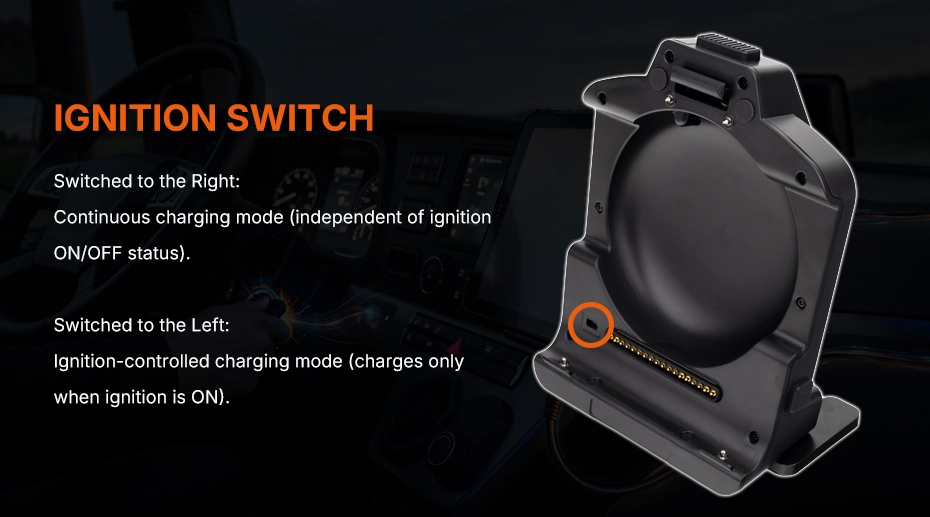
CRD865 vehicle dock ignition switch location diagram

1. Three modes, not two

It is tempting to think in terms of “has ignition control” or “does not”. In practice there are three behaviours:

  • External switch — the switch is a physical component on the cable or bracket; the installer wires it to ACC/IGN.

  • Internal switch — the logic is inside the dock, with a factory default that is either independent or ignition-dependent.

  • No ignition logic — the dock follows the supply; there is no ignition input to read.

2. Model matrix

Dock / bracketSwitchDefault behaviour
CRD880ExternalFollows the ignition signal wired by the installer.
CRD865ExternalSame as CRD880.
CRD1065ExternalSame as CRD880.
BKT865NoneNo ignition logic; power follows the supply.
BKT865-LAN / CRD864InternalDefault independent; can be configured to follow ignition.
CRD680InternalDefault dependent on ignition; can be set independent.
CRD665NoneCannot read the ignition line; always follows supply.

Specify the dock SKU, not the tablet. The same MDT865 can ship with CRD865 (external switch) or BKT865 (no switch). The tablet behaves differently because the dock does.

3. What “external switch” means in practice

On CRD880, CRD865 and CRD1065, the switch is a physical part of the harness or bracket. The installer connects it to the vehicle's ACC or IGN line, and the dock uses that signal to power the tablet on and off.

This is the most flexible option for mixed fleets: the same dock can be wired to follow ignition, or wired to permanent power when the vehicle has no usable ACC line. The trade-off is that the behaviour depends on the installation — a poorly chosen tap point will look like a dock fault.

4. Internal switch: independent vs dependent

BKT865-LAN and CRD864 ship with an internal switch whose default is independent — the dock does not wait for ignition by default. CRD680 ships with the opposite default: dependent on ignition.

Both can be changed at the factory or through the configuration package, but the default matters for first-boot behaviour. If your installation team assumes “it will follow ignition”, a CRD864 will stay on after the driver leaves; if they assume “it stays on”, a CRD680 will shut down when the key is turned off.

5. CRD665: no switch, no ignition line

CRD665 has neither a switch nor the ability to read an ignition line. It follows the supply. For a handheld used in a cradle, that is usually fine; for a vehicle that sits for days, it means the tablet stays powered until the supply is cut. If the deployment needs ignition behaviour on an MDT665, the power has to be switched externally — the dock will not do it.

6. Selection checklist

Confirm the following before specifying the dock:

Does the vehicle have a usable ACC/IGN line? If not, an external-switch dock needs a different wiring plan.
Should the tablet stay on with the key off (parked diagnostics, kiosk)? Then choose independent, or wire permanent power.
Is the dock BKT865 or CRD665? Then ignition control must come from outside the dock.
Is the default on CRD864/CRD680 the one you need, or must it be reconfigured before shipping?

7. Frequently Asked Questions

Can I add an ignition switch to BKT865?

Not inside the dock — it has no switch and no ignition input. Use an external relay or choose a CRD model.

Why does my CRD864 stay on after the key is off?

Its default is independent. It can be configured to follow ignition, but that is a factory/configuration change, not a wiring fix.

Does the tablet model change the behaviour?

No. The switch and its default live in the dock; the tablet only reacts to power.

What is the input range?

9–36V for the tablet/dock; camera configurations start at 11V. See the power and DC-DC guide for tap points and cranking.

For tap points, cranking voltage and DC-DC sizing, read Vehicle Power Tap Point & DC-DC Converter Sizing. For dock options, see our docking station matrix or vehicle docks and accessories.

Not sure which dock fits your vehicle?

Send us the vehicle type, ACC behaviour and tablet model — we will confirm the dock SKU and default configuration.
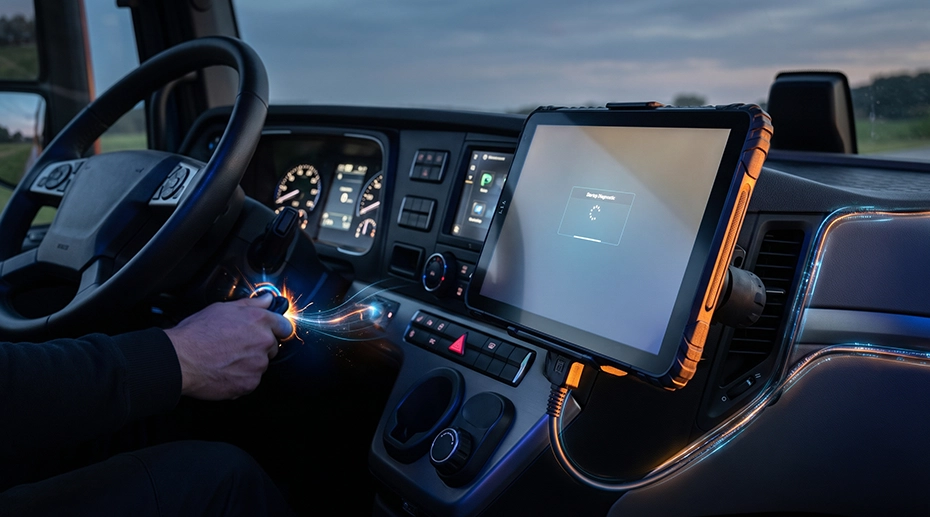
Rugged vehicle tablet in powered dock mounted inside truck cab

Built for Faster Industrial Deployment

Rugged hardware solutions that help you move from testing to deployment faster.

  • Fast Delivery

    Popular models ready to ship for quick deployment.

  • Rugged Hardware

    Reliable, durable devices built for real-world operations.

  • Flexible Integration

    Rich interfaces, docking solutions and accessories for diverse needs.

  • OEM & Customization

    Hardware built around your project with long-term support.