Vehicle Power Tap Point and DC-DC Converter Sizing — Why a Tablet Reboots Mid-Shift and How to Stop It
A tablet rated for 9–36V input reboots once a shift. The vehicle battery reads 13.8V at rest. The tablet reboots when the driver cranks the engine, when the hydraulic pump engages, or when the alternator load changes. The input range is correct. The tap point is not. The converter, if there is one, is undersized. This article covers the three points on a vehicle circuit where power can be tapped, the voltage behaviour at each, and the converter sizing that keeps the tablet’s input above its minimum during every transient the vehicle produces.
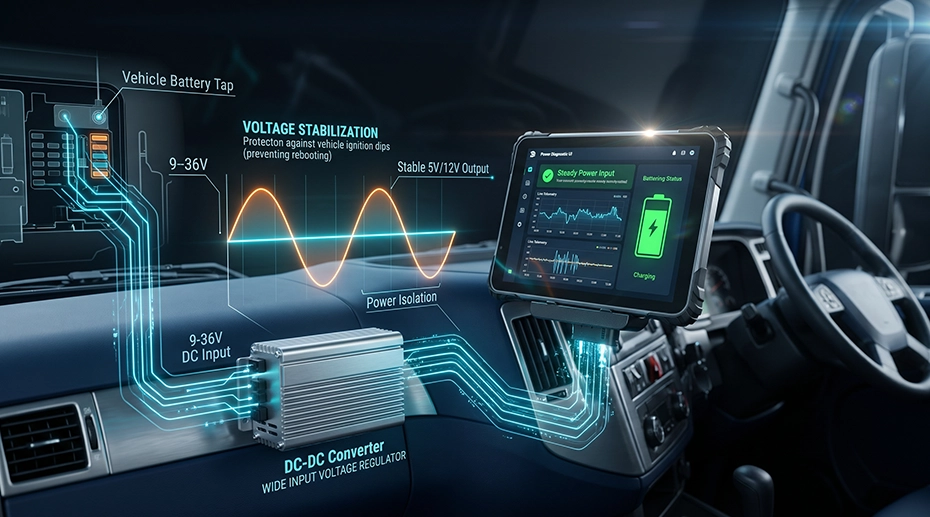
Table of Contents
1. The Three Power Tap Points
A vehicle circuit has three points where the tablet dock can tap power. Each has a different voltage behaviour under load, and each produces a different failure mode if the tablet is connected directly.
The most common installation error is tapping the tablet dock from a circuit that is shared with the starter motor, the hydraulic pump, or the alternator field. When that circuit draws a large current, the voltage at the tap point drops well below the battery voltage. The tablet sees the drop as an input failure and reboots. The cranking voltage drop guide covers the oscilloscope measurement that identifies this condition.
2. Cranking Voltage Drop
When the starter motor engages, it draws several hundred amps from the battery. The battery terminal voltage drops momentarily — typically to 8–10V on a 12V system, and to 16–20V on a 24V system. The drop lasts a few hundred milliseconds. For a tablet that is powered directly from the battery, that drop is below the 9V minimum of the input range.
The same behaviour occurs on a smaller scale when the hydraulic pump starts, when the alternator load changes, or when a high-current accessory switches on. Each transient produces a voltage dip. A tablet without input filtering sees each dip as a power interruption and reboots. The vehicle power architecture page covers the input filtering and TVS protection built into the tablet’s power stage.
Input filtering absorbs the short transients. It does not absorb a sustained sag — for example, a circuit that is shared with the hydraulic pump and drops for several seconds while the mast is raising. That kind of sag requires either a different tap point or a DC-DC converter with a large enough input capacitor to ride through the event. The DC-DC converter analysis covers the isolation and hold-up architecture for sustained sag conditions.
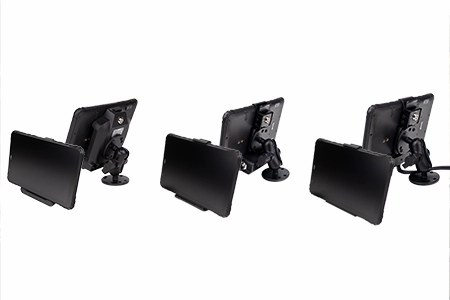
TOPICON MDT880 / MDT865 Vehicle Docking Guide
Vehicle docking installation with 9–36V wiring harness, ignition switch, and fuse protection.
3. DC-DC Converter Sizing
When the vehicle supply is outside the tablet’s 9–36V input range — a 48V or 80V forklift, or a 12V circuit that sags below 9V during cranking — a DC-DC converter is required. The converter accepts the full vehicle voltage and delivers a stable output within the tablet’s input range.
Three parameters determine whether the converter is correctly sized.
• Output current: the converter must deliver the tablet’s peak current plus margin. A tablet with a 1000-nit display and multiple radios draws more current than its idle rating suggests. The peak current occurs at boot and during simultaneous backlight + radio + camera operation.
• Hold-up time: the converter must maintain its output during a brief input sag. The hold-up time is set by the input capacitor. A converter with a large input capacitor rides through a cranking event without the output dropping; a converter with a small capacitor passes the sag through to the tablet.
The tablet models in the MDT series accept 9–36V input directly, which covers most 12V and 24V vehicle systems without a converter. The MDT865 and MDT880 are designed for this range. The MDT1065 and MDT1080 use the same input range for 10-inch deployments. A converter is only required when the vehicle voltage falls outside this range.
4. 48V and 80V Forklift Systems
A forklift traction battery is 24V, 48V, or 80V. The tablet cannot connect to the battery directly. A DC-DC converter steps the battery voltage down to the tablet’s input range, and the converter has to survive the same transient environment that the forklift’s hydraulic and traction systems create.
Two forklift-specific conditions matter. First, the hydraulic pump draws a large current when the mast raises, which causes a voltage sag on the battery circuit. The converter must ride through that sag without letting its output drop. Second, the traction motor and the hydraulic pump are inductive loads that produce voltage spikes when they switch. The converter must have transient suppression on its input.
The tap point on a forklift should not be shared with the hydraulic pump or the traction motor. A dedicated tap from the battery, with its own fuse and converter, is the reliable configuration. The forklift mounting and power guide covers the converter sizing and the tap point selection for forklift deployments.
5. Ignition Sense and the ACC Line
The ACC line is not a power source. It is a signal. It tells the tablet dock whether the ignition is on or off, so the tablet can power on, sleep, or shut down according to the application’s configuration. The ACC line carries a low current and should not be used to power the tablet.
The power connection and the ignition signal are separate wires in the dock harness. The power wire comes from the tap point through the fuse and converter. The ACC wire comes from the ignition switch or a switched supply. Both must be connected for ignition-controlled behaviour. The ignition control guide covers the transition sequence and the application-level hooks that use the ACC signal.
Single Point of Failure
A tablet that reboots once a shift looks like a software problem and is almost always a power tap problem. The driver reports a lost session, a missed scan, or a navigation restart. The application log shows a clean boot. The technician cannot reproduce the issue because the vehicle is stationary and the hydraulic pump is not engaged. The root cause is a voltage sag at the tap point that the tablet’s input filtering cannot absorb. Moving the tap point, adding a converter with adequate hold-up time, or separating the tablet circuit from the high-current loads is the fix. The tablet’s 9–36V input range is a specification, not a guarantee — it is valid at the tablet’s connector, and the wiring between the connector and the battery determines whether that range is actually delivered.
6. Wiring Checklist
Before connecting a tablet dock to a vehicle, confirm the following.
• Tap point: is the tablet circuit shared with the starter, the hydraulic pump, or the alternator? If yes, move the tap to a dedicated circuit.
• Fuse: is the tablet circuit fused independently, at the tap point, with a rating appropriate for the converter and the tablet?
• Converter input range: does the converter accept the full vehicle voltage, including transient spikes?
• Converter output current: is the converter rated for the tablet’s peak current plus margin?
• Hold-up time: does the converter maintain its output during a cranking event or a hydraulic pump start?
• ACC signal: is the ACC wire connected from the ignition switch to the dock harness, separate from the power wire?
• Cable gauge: is the power cable sized for the peak current at the installed length? A cable that is too thin adds its own voltage drop.
• Ground: is the dock ground connected to the chassis at the same point as the converter ground?
• Weather sealing: are the connections sealed against moisture if the tap point is outside the cab?
The docking station matrix covers the power harness options for each tablet model. The OEM customization program covers custom harness configurations for volume deployments.
7. Frequently Asked Questions
Why does the tablet reboot when the engine starts?
The starter motor draws several hundred amps during cranking, which causes the battery terminal voltage to drop momentarily below the tablet’s 9V input minimum. If the tablet is powered from a circuit that sees that drop, it reboots. The fix is either a dedicated tap point with a converter that has adequate hold-up time, or a converter with a large input capacitor that rides through the event. The cranking voltage guide covers the measurement and the fix.
Can the tablet connect directly to a 12V or 24V vehicle battery?
The tablet accepts 9–36V input directly, which covers the nominal range of a 12V or 24V system. But the nominal voltage is not the actual voltage. The battery terminal voltage rises to 14V or 28V during charging and drops below 9V or 18V during cranking. A direct connection from the battery without a converter exposes the tablet to both extremes. The input filtering absorbs the short transients; a converter or a dedicated tap point handles the sustained conditions.
What DC-DC converter is needed for a 48V or 80V forklift?
The converter must accept the forklift’s full battery voltage, including transient spikes, and deliver a stable output within the tablet’s 9–36V input range. It must be rated for the tablet’s peak current plus margin, and it must have enough hold-up time to ride through the hydraulic pump start. The forklift power guide covers the sizing and the tap point selection.
Can the ACC line be used to power the tablet?
No. The ACC line is a signal, not a power source. It carries a low current and is used to tell the dock whether the ignition is on or off. The power wire is separate and comes from the tap point through the fuse and converter. Both must be connected for ignition-controlled behaviour. The ignition control guide covers the transition sequence.
Why does the tablet reboot when the hydraulic pump starts?
The hydraulic pump draws a large current when it starts, which causes a voltage sag on the circuit that supplies it. If the tablet is tapped from the same circuit, the sag reaches the tablet’s input and causes a reboot. Moving the tap point to a dedicated circuit, or adding a converter with adequate hold-up time, eliminates the reboot. The DC-DC converter analysis covers the hold-up architecture.
Wiring Vehicle Tablets into a Fleet?
The tap point, the fuse, and the converter sizing determine whether the tablet’s 9–36V input range is actually delivered at the connector. Request a hardware evaluation kit or discuss the power wiring for your vehicle class.
Related Power & Wiring Resources