Managing Spare Devices in Fleet Deployments – Inventory Planning for System Integrators
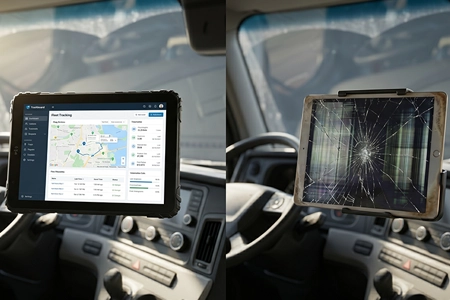
"How many spares should we keep?" It sounds like a simple logistics question. But for system integrators managing multi-year fleet contracts, the spare device strategy determines whether a tablet failure means a 30-minute swap or a 3-day vehicle outage. Here's how to plan your buffer stock, pre-configure replacements, and manage the flow of devices between active duty, spare pool, and retirement.
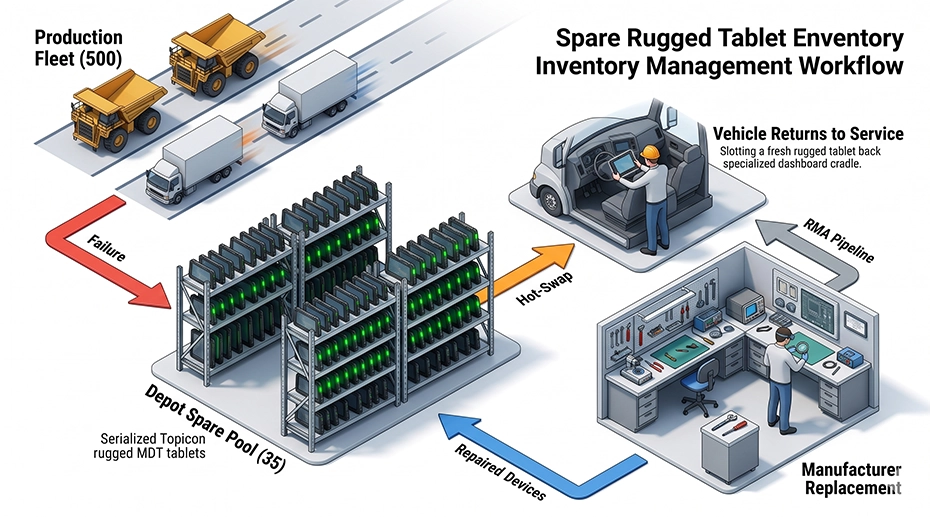
Table of Contents
Field Experience
Across large fleet deployments, system integrators typically maintain 5–10% spare inventory depending on:
• Geographic distribution of vehicles
• Environmental conditions at deployment sites
• Manufacturer RMA turnaround time
About the Author
TOPICON Fleet Deployment Team
Hardware engineering and deployment specialists supporting system integrators with rugged MDT provisioning, MDM pre-enrollment, and fleet staging services for commercial vehicle and industrial mobility projects worldwide.
1. The Real Cost of Getting Spare Planning Wrong
Too few spares, and a single tablet failure creates a cascading operational problem: the driver is idle, the vehicle is idle, the delivery window is closing, and your support desk is fielding calls while trying to source a replacement that should have been on the shelf. Too many spares, and you're carrying thousands in depreciating hardware that's consuming MDM licenses, storage space, and periodic maintenance labor. This is where the superior lifecycle economics of purpose-built rugged tablets with guaranteed supply continuity become critical — when a device fails, you can deploy a spare that's the exact same model, same form factor, and same OS version, without the compatibility headaches that plague consumer tablet fleets.
The right spare strategy isn't a single number. It's a formula that adapts to fleet size, device failure rate, RMA turnaround time, and the operational cost of vehicle downtime. Here's how to build it.
"We won a contract to deploy 200 tablets across a regional delivery fleet. We ordered exactly 200 — no spares. Three months in, 8 tablets had failed from various causes. We had to pull devices from our own internal stock, re-flash them overnight, and express-ship them to keep the fleet SLA. The labor cost of those emergency replacements exceeded the cost of the spare devices we should have ordered in the first place."
— Project manager, fleet telematics integrator
2. The Spare Ratio: How Many Is Enough?
The baseline spare ratio for rugged MDT deployments is 5-10% of the active fleet. But that range is wide for a reason — the right number depends on four variables that change with every deployment.
 Spare Ratio Calculation Formula
Spare Units = (Active Fleet × Failure Rate × RMA Turnaround Weeks) + Minimum Buffer
Example: 100 active tablets, 3% annual failure rate, 2-week RMA turnaround, 2-unit minimum buffer.
= (100 × 0.03 × 2/52) + 2 = (100 × 0.03 × 0.038) + 2 = 0.114 + 2 = 3 spare units minimum (round up to the nearest whole unit).
3. Pre-Configuration: A Spare on the Shelf Is Not a Ready Spare
The single most common spare device mistake: keeping spare tablets sealed in their original packaging, unconfigured. When a vehicle tablet fails, someone needs to unbox the spare, enroll it in MDM, install fleet applications, apply security policies, configure the kiosk mode or launcher, and test connectivity — a process that takes 2-4 hours if everything goes smoothly. During those hours, the vehicle is idle. For system integrators managing fleet computing hardware deployments, pre-configuration is what turns a spare device from a project into a 15-minute swap.
A properly pre-configured spare device can be swapped in under 15 minutes. Here's what that configuration looks like.
Spare Device Pre-Configuration Checklist
MDM-enrolled with zero-touch enrollment: The device is registered in your MDM platform and will automatically pull its configuration profile on first boot. No manual enrollment needed at the depot.
All fleet applications pre-installed: ELD, navigation, dispatch, DVIR inspection, and any custom applications are installed and updated to the current production version. The spare should match the production fleet exactly — not be running a newer or older app version.
Security policies applied: Encryption enabled, screen lock configured, VPN profiles installed, and any compliance-required settings enforced. The spare device must pass the same security audit checks as production devices.
OS version frozen at production build: The spare should be running the same Android version and security patch level as the active fleet. Do not allow the spare to auto-update to a newer version while sitting in storage — it will be incompatible with fleet apps that haven't been validated against the newer OS.
Labeled and logged in asset management: Each spare has a unique asset tag, serial number recorded, and its configuration date logged. When a spare is deployed, the asset record is updated with the vehicle it replaced and the date of deployment.
Battery charged to 50-60% for storage: Lithium-ion batteries degrade fastest when stored at 100% charge. Store spares at 50-60% charge in a cool, dry location. Top up to 100% when the spare is activated for deployment.
4. The Hot-Swap Procedure: 15 Minutes from Failure to Fully Operational
When a tablet fails in a vehicle, the swap procedure should be documented, rehearsed, and executable by the driver or a depot technician without IT support. The goal: remove the failed device, install the spare, and have the vehicle operational within 15 minutes. For fleets using vehicle-mounted dock solutions with docking stations, the physical swap takes less than 30 seconds — the remaining time is for software verification and asset logging.
| Step 1 | Undock the failed tablet. If it's still responsive, perform a manual data sync to ensure any cached ELD logs or inspection data is uploaded before removal. |
| Step 2 | Retrieve the pre-configured spare from inventory. Verify the spare's asset tag matches the deployment record. |
| Step 3 | Dock the spare tablet. It should power on automatically via ignition sense, connect to MDM, and pull its configuration. Verify that all fleet apps launch correctly. |
| Step 4 | Update the asset management system: record the failed device's serial number, the spare's serial number, the vehicle ID, and the timestamp. This is your audit trail for SLA reporting and warranty claims. |
| Step 5 | Package the failed device for RMA return. Include a brief note describing the failure symptom — not just "doesn't work," but specific observations that help the manufacturer diagnose the root cause. |
5. The RMA Pipeline: Why Your Spare Count Needs Extra Buffer
When a device fails and a spare takes its place, the failed device enters the RMA pipeline. It ships back to the manufacturer, gets diagnosed, gets repaired or replaced, and eventually returns to you — typically in 1-3 weeks. During those weeks, the spare that replaced it is now in active duty, and your spare pool has shrunk by one unit.
If a second device fails before the first RMA unit returns, you need a second spare. If a third fails, a third spare. This is why your spare pool needs to account for the RMA pipeline — not just the active fleet failure rate. For integrators managing rugged mobile data terminals, the RMA buffer is an essential planning parameter.
RMA Buffer Calculation
RMA Buffer = (Active Fleet × Monthly Failure Rate × RMA Turnaround Months)
The RMA buffer is additional spare units on top of your minimum spare count — specifically to cover devices that are in transit or being repaired, not available for immediate deployment. For a 100-tablet fleet with a 0.25% monthly failure rate and a 3-week RMA turnaround, the RMA buffer is (100 × 0.0025 × 0.75) = 0.1875 — typically rounding up to 1 extra unit. This buffer is separate from your minimum spare count.
6. Device Retirement: When a Spare Becomes a Liability
Not every device that returns from RMA should go back into the spare pool. And not every spare that's been sitting in storage for 3 years should be deployed to a vehicle. Device retirement is the often-overlooked final stage of the spare lifecycle. For integrators managing hardened industrial tablets across multi-year contracts, having a documented retirement policy prevents degraded devices from creeping back into production.
When to Retire a Device from the Spare Pool
End of planned lifecycle (5-7 years): Even if the device still works, it's no longer receiving OS security updates. Deploying it extends the attack surface of your fleet.
Multiple repair cycles: A device that has been repaired more than twice has a statistically higher failure rate than a new device. It's better as a bench test unit than a production spare.
Battery health below 70%: A spare with a degraded battery may pass initial testing but fail during its first full shift in a vehicle. Battery health should be checked as part of periodic spare maintenance.
Incompatible OS version: If the fleet has upgraded to a newer Android version and the spare cannot be upgraded (hardware limitation or chipset support ended), it cannot be deployed as a production spare. It can be retained for parts harvesting or bench testing.
7. Frequently Asked Questions
How many spare tablets should I keep for a 100-vehicle deployment?
For rugged MDTs in standard fleet environments: 5-7 spare units (5-7% of fleet). This includes minimum spares plus RMA pipeline buffer. For harsh environments or geographically dispersed fleets: 8-10 spare units. Always round up — the cost of one extra spare is negligible compared to the cost of one vehicle sitting idle waiting for a replacement.
Should spare devices be stored fully charged?
No. Lithium-ion batteries degrade fastest at 100% charge, especially in warm storage environments. Store spares at 50-60% charge in a temperature-controlled location. Charge to 100% when the spare is activated for deployment. Check and top up stored spares every 3 months — batteries self-discharge over time and should not be allowed to drop below 20%.
How do I handle spare devices when the fleet OS is upgraded?
Upgrade spares as part of the staged rollout — after the pilot phase confirms stability, upgrade the spare pool alongside the active fleet. Never leave spares on an older OS version than the production fleet: if a spare is deployed with an older OS, it will immediately trigger MDM compliance violations and may be incompatible with fleet apps that have been updated for the newer OS.
What devices should not remain in the spare pool?
Devices that have undergone repeated repairs, units running an obsolete Android version no longer receiving security patches, devices with battery health below 70% of original capacity, and any device that cannot run the current production OS version. These should be retired, not kept as spares — deploying them creates a liability, not a solution.
Should spare devices consume MDM licenses?
It depends on your MDM platform. Some vendors allow inactive device pools where spares can be enrolled without consuming a full license until activated for deployment. Others require a license for every enrolled device regardless of active status. Factor MDM licensing costs into your spare pool calculations — 5-10 spare licenses across a 100-device fleet is a small cost relative to vehicle downtime, but should be budgeted from the start.
Does TOPICON support advance replacement for fleet deployments?
Yes. TOPICON offers advance replacement programs for fleet customers and system integrators — replacement devices ship before the failed unit is returned, minimizing the time your spare pool is depleted. Talk to our fleet support team →
Fleet Spare Planning Worksheet
Need help calculating spare inventory for your deployment? TOPICON supports system integrators with:
Talk with our fleet deployment team →
Related Lifecycle & Deployment Resources