Fleet Tablet Keeps Disconnecting from Cellular? – Diagnosis and Hardware Fixes for Vehicle Deployments
The ELD logs stop uploading. Dispatch messages go undelivered. The navigation app shows "offline" while the truck is doing 65 on the interstate. The driver looks at the signal bars — three out of four. So why is the tablet disconnected? Cellular connectivity in a moving vehicle is fundamentally different from a stationary device, and the symptoms don't always match the root cause.
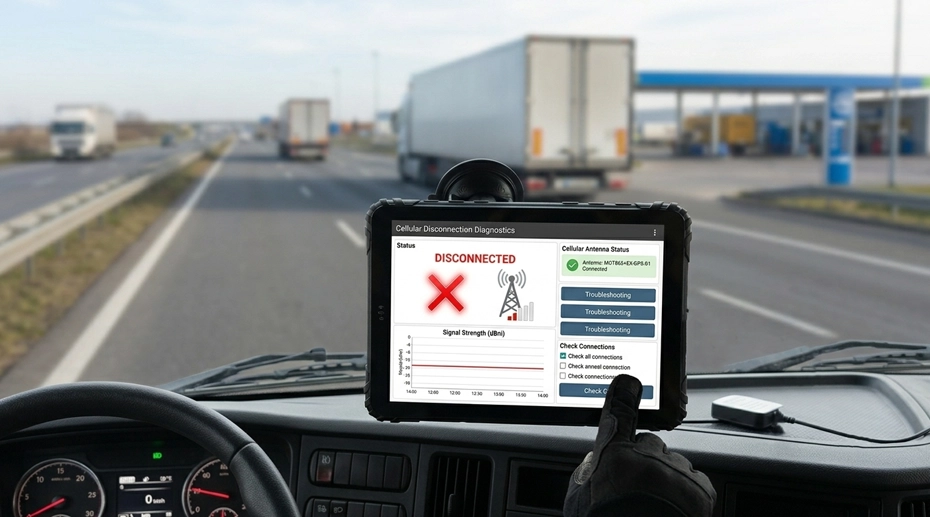
Table of Contents
1. Field Experience
Fleet cellular connectivity problems that get solved permanently share three characteristics:
Signal strength (RSRP) and signal quality (RSRQ/SINR) were measured separately
The vehicle itself was recognized as part of the RF environment
About the Author
TOPICON Fleet Deployment Team
Hardware engineering specialists supporting system integrators with cellular connectivity optimization, external antenna selection, multi-carrier deployment strategies, and RF troubleshooting for vehicle-mounted computing platforms across commercial fleets and industrial mobility applications.
2. Five Reasons Fleet Tablets Lose Cellular Connection
When a vehicle-mounted tablet drops its cellular connection, the instinct is to blame the carrier. But in fleet deployments, the carrier is rarely the root cause. The vehicle itself — its metal body, its motion, its electrical system — is the dominant factor in cellular reliability. Here are the five most common causes, how to diagnose each, and what hardware choices solve them. For integrators specifying professional mobile data terminals for fleet deployment, these connectivity factors should be evaluated before hardware procurement, not after installation.
3. Cell Handover Interruptions: When Moving Between Towers Breaks the Connection
What's Actually Happening
A stationary device connects to one cell tower and stays there. A vehicle moving at highway speed transitions between cell towers every few minutes. Each transition — called a handover or cell reselection — requires the modem to drop its connection to the current tower, scan for a stronger signal from a neighboring tower, authenticate, and re-establish the data session. This process takes 200-500 milliseconds under ideal conditions, and several seconds if the modem hesitates between towers with similar signal strength.
Fleet applications experience this as a brief disconnection. An ELD application sees the TCP socket close and must re-establish it. A dispatch application loses its push notification channel and must re-subscribe. If the application isn't designed to handle frequent reconnection events gracefully, the brief handover becomes a persistent disconnection that requires manual intervention.
Hardware Solutions
External antenna with higher gain: A stronger received signal reduces the modem's hesitation between towers. When one tower is clearly stronger than the next, the handover is faster and cleaner. An external antenna with 3-5 dBi gain — compared to 0-2 dBi for an internal antenna — provides that signal margin.
Modem firmware optimized for mobility: Not all cellular modems handle high-speed handover equally. Industrial-grade modems — typically Qualcomm or Telit modules — include mobility optimization that biases the modem toward faster handover decisions at the expense of slightly higher power consumption. Consumer-grade modems prioritize power efficiency over handover speed. Vehicle-mounted data terminals designed for fleet mobility use industrial modems with mobility-optimized firmware.
Application-layer reconnection logic: While not a hardware fix, the fleet application should implement exponential backoff reconnection with a maximum retry interval of 30 seconds. If the app retries every second after a disconnect, it will flood the modem with connection requests during a handover — making the problem worse.
4. Internal vs External Antenna: The Biggest Single Factor
What's Actually Happening
A cellular signal loses approximately 10-20 dB passing through a vehicle's metal body — and that's before the signal reaches the tablet's internal antenna, which is itself inside a metal-framed device mounted on a metal dashboard. The combined attenuation can reduce a usable outdoor signal of -85 dBm to a marginal indoor signal of -105 dBm inside the vehicle cabin. At -105 dBm, the modem can maintain a connection when stationary but will drop it during a handover.
An external antenna mounted on the vehicle roof eliminates this attenuation entirely. The signal arrives at the antenna before it encounters the vehicle body. An active antenna with a built-in LNA amplifies the signal further — compensating for the cable loss between the antenna and the tablet.
Antenna Selection Guide
Cable loss matters: A 5-meter RG174 cable run at 1900 MHz (LTE Band 2) loses approximately 4-5 dB. That's enough to negate the gain advantage of a passive external antenna. Use the shortest possible cable run, and for runs over 3 meters, use low-loss cable (LMR-195 or equivalent) or an active antenna with LNA. For vehicle-mounted computing platforms with integrated connectivity, external antenna ports should be standard — not optional.
5. Signal Strength vs Signal Quality: Why "Full Bars" Means Nothing
What's Actually Happening
Signal bars on a tablet display an averaged, simplified metric that's useless for diagnostics. The only numbers that matter for cellular troubleshooting are RSRP (Reference Signal Received Power — signal strength) and RSRQ/SINR (Reference Signal Received Quality / Signal-to-Interference-plus-Noise Ratio — signal quality).
You can have excellent RSRP (strong signal, full bars) and terrible RSRQ (high noise, poor quality). This is common near cell towers with many users — the tower is loud but the channel is crowded. The modem shows full bars but can't pass data reliably. Conversely, you can have marginal RSRP (weak signal) but excellent RSRQ (clean channel) — the modem shows one bar but data flows fine. Fleet managers who troubleshoot based on signal bars are solving the wrong problem.
Diagnostic Check
| RSRP (Signal Strength) | Excellent: -80 dBm or better. Good: -80 to -90 dBm. Marginal: -90 to -100 dBm. Poor: below -100 dBm. |
| RSRQ (Signal Quality, LTE) | Excellent: -10 dB or better. Good: -10 to -15 dB. Marginal: -15 to -20 dB. Poor: below -20 dB. |
| SINR (Signal Quality, 5G) | Excellent: 20 dB or higher. Good: 13-20 dB. Marginal: 0-13 dB. Poor: below 0 dB. |
How to read these on a fleet tablet: Apps like Network Cell Info Lite or the Android hidden diagnostic menu display RSRP and RSRQ in real time. For fleet-wide monitoring, MDM platforms can collect these metrics from all devices and map connectivity blackspots on your routes — showing you where external antennas are needed and where the carrier needs to improve coverage. For fleets running enterprise fleet management tablets, these diagnostic metrics should be collected continuously to build a coverage map of your operating routes.
6. Single-Carrier vs Multi-Carrier: Why One SIM Is Never Enough for Regional Fleets
What's Actually Happening
No carrier has perfect coverage across an entire regional or national route. A fleet that operates on a single carrier will experience dead zones on every route — the same locations, every day, for every vehicle. Drivers learn where the dead zones are and plan around them, but ELD logs don't care — a gap is a gap.
Hardware Architecture Options
Recommendation for fleet integrators: Specify a tablet with eSIM support and at least one physical SIM slot. This gives you the flexibility to deploy with a physical SIM today and transition to eSIM-based multi-carrier management as your fleet grows or as carrier coverage changes. Industrial vehicle terminals with dual SIM and eSIM capability provide the most flexibility for regional and national fleet deployments. Configure your multi-carrier fleet hardware →
7. Environmental Signal Blockers: Ports, Mines, and Metal Structures
What's Actually Happening
Some fleet operating environments are inherently hostile to cellular signals — not because the carrier coverage is poor, but because the physical environment blocks, reflects, or absorbs RF energy.
Ports and container yards: Stacks of metal containers create RF shadows — signal dead zones between container rows. The crane that's loading containers is also a moving RF reflector. External antennas mounted at the highest point of the vehicle help, but the fundamental solution is often a private LTE or WiFi network for the yard, with the tablet connecting to the local network rather than the macro cellular network.
Underground mining: No cellular signal penetrates rock. Communication requires leaky feeder cables (radiating coaxial cable) run through the tunnel, connected to a surface base station. The tablet connects to the leaky feeder signal, not to a cell tower.
Steel-framed warehouses: The metal structure acts as a partial Faraday cage. Signal inside a steel warehouse can be 20-30 dB weaker than outside. An external antenna on the vehicle roof helps, but warehouse deployments often require indoor distributed antenna systems (DAS) or WiFi offloading when the vehicle is indoors.
Planning action: For any fleet deployment in these environments, conduct a site survey with the actual tablet hardware and carrier SIM — not a consumer phone, not a different device. The tablet's modem and antenna configuration are unique, and a survey with different hardware will give misleading results. Computing hardware built for heavy industrial environments often requires supplemental connectivity infrastructure — plan for it before deployment, not as a post-installation fix.
8. Cellular Disconnection Diagnosis Quick Reference
9. Frequently Asked Questions
Why does my tablet show full signal bars but keeps disconnecting?
Signal bars measure RSRP (strength) averaged over time — they don't show RSRQ (quality). You can have excellent signal strength on a congested cell tower where the channel is too noisy for reliable data. Check RSRQ — if it's below -15 dB, the cell is overloaded. The solution is a multi-carrier strategy that allows the modem to switch to a less congested carrier. Source a multi-carrier capable fleet terminal →
Does an external antenna really improve fleet cellular reliability?
Yes — it's the single most impactful hardware change for vehicle cellular performance. A vehicle body attenuates cellular signal by 10-20 dB. An external antenna on the roof bypasses this attenuation entirely. For highway and rural fleet operations, an external antenna is not optional — internal antennas will produce persistent dead zones at cell edges.
Should I use a single carrier or multiple carriers for my fleet?
For regional or national fleets, multi-carrier is strongly recommended. No single carrier has complete coverage across all routes. A tablet with eSIM or dual SIM capability allows the modem to select the strongest available carrier at any location — eliminating dead zones that are carrier-specific rather than coverage gaps. Vehicle terminals with multi-carrier cellular capability provide this flexibility without managing multiple physical SIM cards.
Do TOPICON tablets support external antennas and multi-carrier SIM configurations?
Yes. TOPICON rugged MDTs support external cellular antennas via SMA connector, with active antenna power supplied by the tablet. Dual SIM and eSIM options are available on select models — contact our engineering team for the specific modem and antenna configuration that matches your fleet's operating routes and carrier environment. Request cellular connectivity specifications →
Troubleshooting Cellular Connectivity in Your Fleet?
TOPICON rugged MDTs support external antennas, dual SIM and eSIM configurations, and industrial-grade modems with mobility-optimized firmware — engineered for reliable cellular connectivity in moving vehicles.
Related Troubleshooting & Hardware Resources