Vehicle Camera Architecture — Dock-Connected Tablets, Camera Hub, and External MDVR
A fleet software vendor plans a vehicle platform with four cameras, CAN Bus data, and 5G backhaul. The initial design assumes a single Android tablet will decode the video, run the driver interface, and push data to the cloud. Whether that architecture works depends on one question: what happens to the video? Live assistance, local recording, and 24-hour continuous recording are three different engineering problems — and they lead to three different hardware decisions.
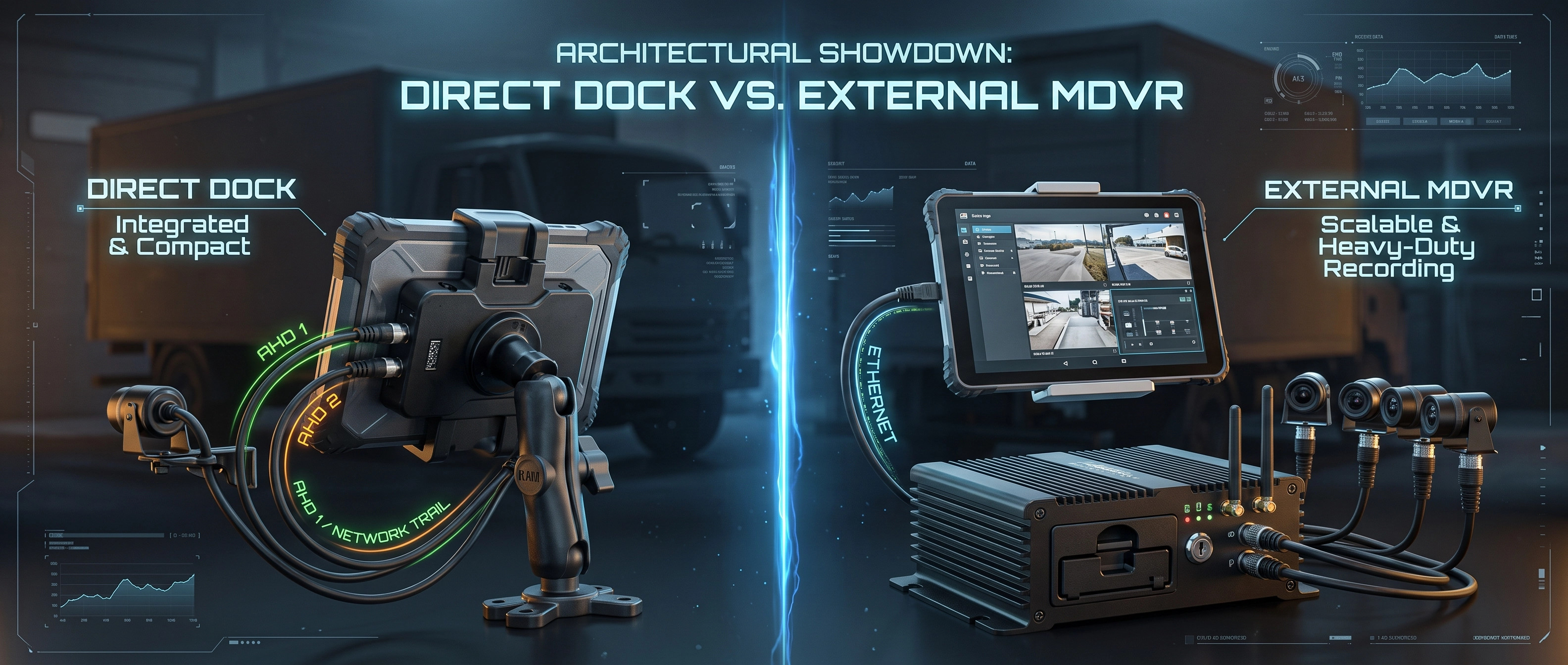
Table of Contents
1. The Architecture Question
A fleet integration project typically starts with a camera count and a list of desired features: rear-view on reverse, blind-spot on turn signal, driver monitoring, incident capture, cloud upload. The camera count is fixed by the vehicle and the safety requirement. What is not fixed is where the video is processed and where it is stored.
Three architectures are used in commercial fleets. In the first, the tablet connects directly to the cameras through a dock — the video decoder and the display driver are inside the tablet, and no video is stored unless the application chooses to write an event clip. In the second, a dedicated camera hub receives the cameras, encodes the video, and either records it locally or streams it to the tablet over Ethernet. In the third, a full MDVR handles all recording and the tablet connects to it for display and control.
None of the three is universally better. The correct choice depends on the video workload: live assistance with event-triggered capture, continuous recording with moderate retention, or continuous 24-hour recording with chain-of-custody requirements. The three workloads have different hardware requirements, different thermal profiles, and different failure modes.
2. Dock-Connected Tablets: Live Assistance and Event Capture
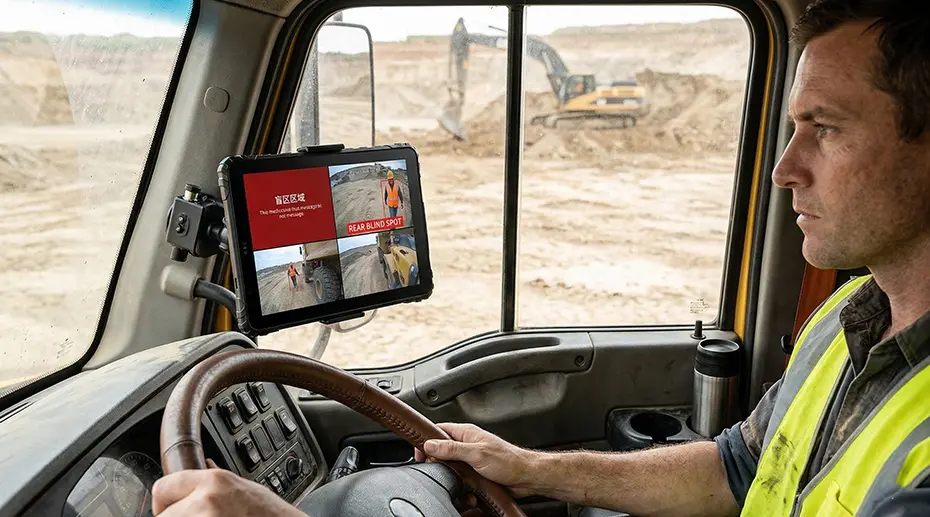
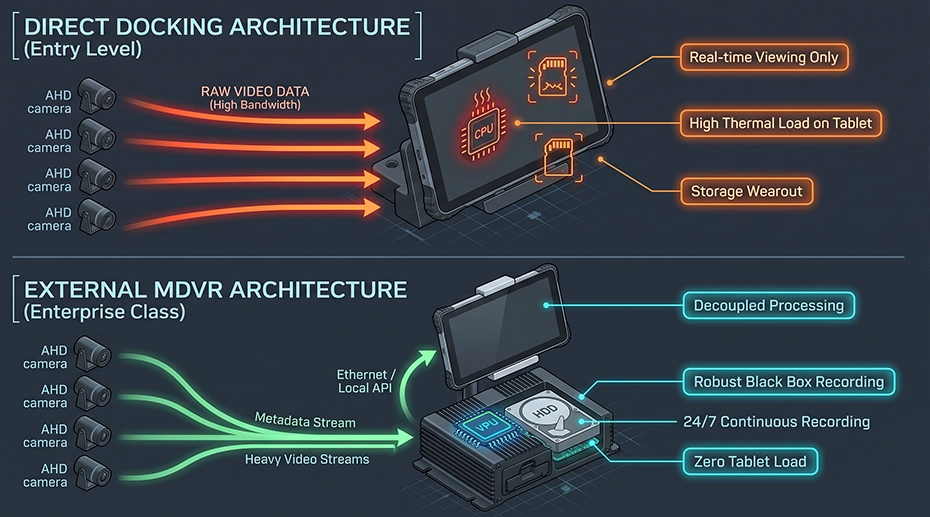
In a dock-connected architecture, the vehicle cameras feed into a dock such as the CRD880-CAM or CRD880-CAN, which passes the AHD video signals directly to the tablet. The tablet decodes the video in hardware and renders it on the display. There is no separate recording device.
This architecture is appropriate when the video workflow is one of the following:
• Driver monitoring and ADAS: the tablet's SoC handles one or two camera inputs for fatigue detection or collision warning. The inference runs locally, and only the event metadata is transmitted.
• Event-triggered capture: on a hard-brake event or a G-sensor trigger, the tablet records a short clip — typically 10 to 30 seconds — and uploads it to the cloud. The rest of the time, no video is written to storage.
The thermal and storage profiles are the reason this architecture works. The tablet's VPU decodes one video stream at a time during normal operation, so the SoC stays within its thermal envelope. No continuous write to eMMC or UFS occurs, so flash wear is negligible. The camera-to-display path is direct, so latency is in the tens of milliseconds — which is what makes the rear-view and blind-spot features usable in practice. The 4-channel vehicle video tablet platform documentation covers the dock and camera configuration.
Rugged Android Tablet MDT880 with CRD880 — 4-Channel AHD Camera Integration
Demonstration of dock-connected camera integration on the MDT880 platform, including AHD input, on-screen rendering, and camera switching.
3. Camera Hub (HH420 / HH421): Continuous Recording Without a Full MDVR
Between the dock-connected tablet and the full MDVR sits a lighter option: an external camera hub. The HH420 / HH421 accepts up to four AHD or analog cameras, encodes the video in the hub itself, and outputs RTSP streams over Ethernet. The tablet connects to the hub through a compatible cradle and runs the display application — the hub works in the background.
The two variants differ in one respect. The HH420 has no local storage — it provides live RTSP output only. The HH421 adds an internal hard disk and records continuously in a loop. The disk sizes available are 512 GB, 1 TB, and 2 TB, with retention of approximately 2.2, 4.5, and 9 days respectively at 1080p.
• Local recording with moderate retention: HH421 records continuously and keeps days of history. This covers fleets that need incident review without the cost and complexity of a full MDVR.
• Standard RTSP output: the hub exposes a standard RTSP stream that any compatible player can consume, including the tablet and a PC on the same network.
• Works with multiple cradles: the hub connects to CRD865, CRD865-BAS, CRD880, or CRD1065 — the same tablet dock is used as in the dock-connected architecture.
The camera hub is the appropriate choice when the deployment requires continuous recording and multi-day retention, but does not require chain-of-custody evidence, redundant storage, or more than four channels. It keeps the tablet free of encoding and storage work while providing the recording capability that dock-connected cameras cannot offer. The HH420 / HH421 product page covers the deployment wiring, compatible cradles, and configuration.
4. External MDVR: Continuous 24-Hour Recording and Chain of Custody
The third architecture inserts a full MDVR between the cameras and the tablet. The MDVR receives all camera feeds, encodes them with its dedicated hardware encoder, and writes them to an internal SSD or hard drive in a continuous loop. The tablet connects to the MDVR over Ethernet or Wi-Fi and requests a video stream only when the driver or a remote operator needs to view a camera.
This architecture is appropriate when the video workflow requires:
• Chain-of-custody evidence: video that can be used for incident reconstruction or legal proceedings, with the recording device designed to survive power loss and file the recording before shutdown.
• High channel count: five to eight cameras on a single vehicle, exceeding the hub's four-channel input.
• Redundant storage: a separate device whose storage can be removed and archived, independent of the tablet.
The MDVR is not a competitor to the tablet or the camera hub. It is a separate subsystem with its own thermal design, storage, and power management. The tablet handles the display, the user interface, and the 5G gateway. The MDVR handles the video. This separation is what allows each device to be specified for its actual workload rather than compromised between two.
5. Three-Way Comparison
The three architectures differ across the dimensions that determine whether the deployment succeeds in the field.
6. The Thermal and Bandwidth Constraint
The thermal profile of the tablet depends on how many video streams are decoded and rendered at the same time — not on how many cameras are physically connected. A tablet with four cameras connected, where only one stream is displayed at any given moment, runs at a fraction of the thermal load of the same tablet displaying all four streams simultaneously.
The reason is the memory bandwidth and GPU load. Each decoded stream occupies memory buffers that must be read and written at frame rate. A single 1080p stream at 30 fps is manageable. Four simultaneous streams multiply that memory traffic and GPU work. In a vehicle cab that is already exposed to solar gain, the additional heat raises the SoC temperature enough to trigger thermal throttling — the device reduces its clock speed to protect itself, and the frame rate drops.
Both the camera hub and the MDVR architectures relieve the tablet of the encoding workload — the hub or MDVR encodes, and the tablet only decodes the stream it needs to display. This is why the hub approach sits between dock-connected cameras and a full MDVR: it offloads the heaviest work while keeping the hardware footprint smaller than a full MDVR. The thermal management guide covers the heat paths in a vehicle cab.
7. Event-Driven Interaction Design
The interaction pattern that keeps any of these architectures within their thermal envelope is event-driven switching. The tablet does not render any camera stream during normal operation. The business application — navigation, dispatch, or work order — owns the screen. The camera stream is displayed only when a specific event triggers it.
• Turn signal trigger: the trigger input detects the turn signal. The tablet shows the corresponding side camera for the duration of the signal.
• Manual selection: the driver taps a camera button in the application. The tablet shows that camera for a fixed interval, then returns to the business screen.
• Event capture: a G-sensor or a CAN Bus event records a short clip. The video pipeline is active only during that window.
This pattern is enforced by the application layer, but it depends on the hardware layer being able to switch camera inputs quickly. In the dock-connected architecture, the dock and the tablet together provide the switching path. In the camera hub architecture, the hub exposes each channel as a separate RTSP stream, and the application switches between them. In the MDVR architecture, the tablet requests the stream it needs from the MDVR. The AHD camera integration guide covers the input switching and the application-level control interface.
8. CAN Bus Data in All Three Architectures
All three architectures need CAN Bus data. In a dock-connected deployment, the tablet reads CAN directly through a dock such as the CRD880-CAN, or through the EXT-USB-CAN-01 adapter for deployments where the dock does not carry CAN. The application uses the CAN data for the event-driven camera switching described above, and for the telematics workload that is the primary purpose of the deployment.
In the camera hub architecture, the hub handles video and the tablet continues to read CAN through the same dock or adapter path as in the dock-connected deployment. The two workloads are independent — the hub does not interfere with the tablet's CAN access. In an MDVR deployment, the MDVR may read CAN and forward the decoded signals to the tablet over the same Ethernet link that carries the video stream. Either path works. The choice depends on whether the MDVR already integrates CAN, and whether the application needs CAN data at a rate or latency that the MDVR link cannot support. The CAN Bus vehicle tablet platform covers the channel configuration and protocol support.
Decision Framework
The camera count does not determine the architecture. The video retention requirement does.
If the deployment requires live assistance, event capture, or AI inference on one or two streams with no retention beyond short event clips, a dock-connected tablet is the simplest and lowest-cost architecture — and it delivers the lowest latency. If the deployment requires continuous recording with multi-day retention but does not need chain-of-custody evidence or more than four channels, the camera hub (HH420 / HH421) offloads encoding and storage from the tablet while keeping the hardware footprint smaller than a full MDVR. If the deployment requires 24-hour continuous recording across five or more channels with evidence-grade storage, the recording workload belongs on a dedicated MDVR.
The tablet, the camera hub, and the MDVR are not alternatives. They are three subsystems that each solve a different part of the vehicle video problem, and the correct one depends on what happens to the video after it is captured.
9. Frequently Asked Questions
Can a rugged tablet record four cameras continuously?
A tablet can record four cameras for short event-triggered clips. Continuous recording across a full shift is a different workload: it requires sustained hardware encoding, continuous storage writes, and thermal headroom that a tablet-sized device cannot maintain in a sunlit cab. The flash wear alone — the total bytes written to eMMC or UFS over a year of continuous recording — exceeds the rated endurance of most tablet storage. Either a camera hub like the HH421 or a dedicated MDVR is the appropriate device for that workload.
When should I use a camera hub instead of a full MDVR?
Use a camera hub when the deployment needs continuous recording with multi-day retention, up to four camera channels, and no requirement for chain-of-custody evidence or redundant storage. The HH421 provides 2.2 to 9 days of retention at 1080p depending on HDD size, and works with existing cradles. Use a full MDVR when the requirement is five or more channels, evidence-grade storage, or 24-hour recording across a longer retention window.
Does a dock-connected tablet have enough latency for reverse and blind-spot?
Yes. The AHD signal from the camera reaches the tablet through the dock with a direct hardware decode path. The latency from camera to display is in the tens of milliseconds — well below the threshold at which a driver would notice a delay. The camera hub and MDVR architectures introduce an encoding and network transport step, which raises the end-to-end latency to a few hundred milliseconds. For live assistance, the dock-connected path is the lower-latency option.
How does the tablet switch between camera inputs?
The tablet switches camera inputs in response to an event. The trigger comes from the CAN Bus — gear selector, turn signal, or a body control signal — or from a GPIO input on the dock or the camera hub. The application decides which input to decode and display. In the dock-connected architecture, the switching is handled by the video capture hardware in the dock. In the camera hub architecture, the hub exposes each channel as a separate RTSP stream, and the application switches between streams. The 4-channel vehicle video tablet platform covers the input switching configuration.
Can I use a five-camera configuration with a dock-connected tablet?
A dock such as the CRD880-CAM supports four AHD camera inputs. The camera hub also supports four. A fifth camera would need to be added through a separate interface — USB, IP, or a second docking channel — depending on the tablet model and the application. If the fifth camera must be recorded continuously alongside the other four, the deployment has crossed into MDVR territory. If the fifth camera is only used for on-demand viewing, a mixed input configuration on the tablet may be sufficient.
How is the tablet managed across a fleet with cameras and CAN Bus?
The TOPICON MDM platform handles application deployment, firmware updates, configuration distribution, and remote screen control across the tablet fleet. The camera configuration, the CAN protocol setting, and the event-trigger rules are part of the device configuration and can be pushed to all vehicles from the central console. The MDM server is hosted on TOPICON infrastructure, with no on-premises server required.
Specifying Cameras, CAN Bus, and Display for a Vehicle Platform?
The video retention requirement determines the architecture — dock-connected tablet for live assistance, camera hub for local recording with multi-day retention, or tablet plus MDVR for continuous evidence-grade recording. Request a hardware evaluation kit or discuss the camera and CAN Bus configuration for your deployment.