Sub-Admin Accounts and Audit Trails — Managing Fleet Tablets Across Multiple Customers Without Losing Control
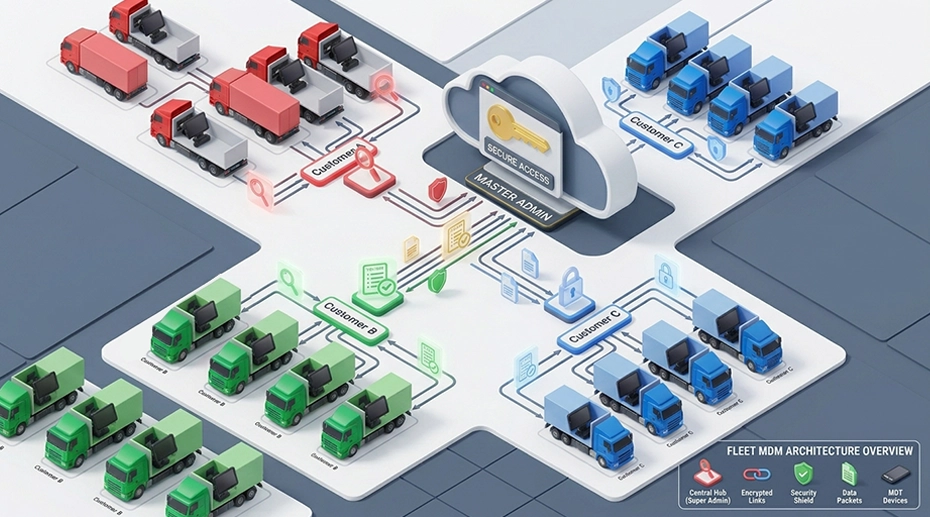
A system integrator in the Netherlands manages 340 in-vehicle tablets across twelve logistics customers. Customer A runs a refrigerated fleet and needs to monitor temperature alerts. Customer B runs last-mile vans and needs to push route updates. Customer C has an internal IT team that wants direct access to their own devices. All three expect to manage their hardware without waiting for the integrator's helpdesk to respond. The MDM platform's multi-tenant architecture is what makes this possible without giving anyone more access than they need.
Field Observation
System integrators managing multiple customer fleets face a structural tension that never appears in a single-fleet deployment:
No customer should have access to another customer's devices
The integrator must retain oversight without becoming a bottleneck
Every administrative action must be traceable for contractual and compliance reasons
About the Author
TOPICON Hardware Engineering Team
Specialists in multi-tenant MDM architecture, role-based access control design, and fleet device governance for system integrators managing multiple customer deployments across European logistics and telematics markets.
The Access Problem: Too Much or Too Little
The simplest access model is one administrator with full control over everything. This works for a single fleet. It breaks down at the second customer. If the integrator's helpdesk staff have full access to all customer accounts, a single misclick can push a firmware update to the wrong fleet, or expose one customer's device inventory to another customer's support ticket. If access is restricted too tightly, every customer request becomes a helpdesk ticket, and the integrator's team becomes the bottleneck for operations that customers could handle themselves.
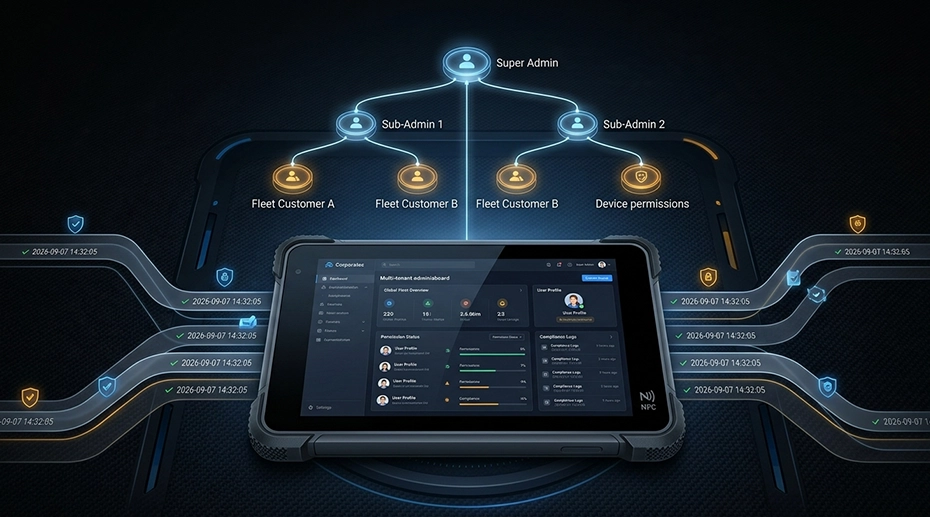
The solution is hierarchical account architecture. The integrator retains a super-admin account with visibility across all customer fleets. Each customer receives a sub-admin account scoped to their own devices only. Within each sub-admin account, granular role permissions determine what the customer can do: view logs, modify configurations, push firmware, or manage users. The MDM server for multi-customer fleet management enforces these boundaries at the platform level, not through procedural discipline.
This is not a convenience feature. For a system integrator whose contract specifies that Customer A must not be able to see Customer B's device data — and whose liability insurance depends on that separation being technically enforced — the difference between "we have a policy against it" and "the platform makes it impossible" is the difference between compliance and exposure.
How Sub-Admin Accounts Work in Practice
The sub-admin account is created from the MDM console in under a minute. The integrator names the account — for example, "Customer A — Fleet Manager" — assigns it a device group containing only Customer A's tablets, and selects which functions the account can access.
▶ Create sub-user — assign device groups and permissions in under a minute
The permissions are granular. A sub-admin can be allowed to:
View Device Status
See online/offline status, firmware version, data usage, and last connection time for their assigned devices — without access to configuration functions.
Update Configuration Files
Push new config profiles to their devices — kiosk mode settings, WiFi credentials, app allowlists — without being able to change firmware versions.
Manage Their Own Users
Create further sub-accounts within their own scope — for example, a shift supervisor who needs view-only access — without involving the integrator.
Not Allowed: Firmware Updates
Firmware OTA remains under integrator control by default. A customer can modify configurations, but cannot push a firmware version that the integrator has not validated for their hardware.
▶ Role access control — granular permissions for each sub-admin account
The Audit Trail: Every Action, Traceable
Access control defines what can be done. The audit trail records what was actually done — by whom, when, and to which devices. Every administrative operation on the MDM server is logged: firmware update commands, configuration changes, device group modifications, user account creation, remote erasure commands. Each log entry carries a timestamp and the identity of the operator who issued the command.
For a system integrator managing fleet tablets across multiple customer contracts, the audit trail serves two purposes. First, it provides the evidence trail when something goes wrong: if Customer A's devices were accidentally updated with the wrong configuration, the integrator can determine exactly who issued the command and when. Second, it provides the documentation that customer auditors and compliance reviewers ask for: proof that access was restricted, that changes were authorised, and that the system was managed according to the contract.
The audit trail is not optional. GDPR accountability requires that organisations be able to demonstrate who accessed personal data and for what purpose. The MDM audit log is the operational record that answers this question for fleet device management — and it is exportable for exactly this reason.
Single Point of Failure
A single administrator account with unrestricted access to every customer's devices is a single point of failure that no amount of trust can mitigate. The account is shared, the password is passed between staff members, and the audit trail — if it exists — shows only that "admin" made a change. When a firmware update is pushed to the wrong customer's fleet, the integrator cannot determine which person was responsible. Sub-admin accounts eliminate this failure by making every action attributable to a specific operator with a specific scope of authority. The audit trail turns "we don't know what happened" into "here is exactly what happened, who did it, and when."
Frequently Asked Questions
How many sub-admin accounts can be created?
There is no fixed limit — the number of sub-admin accounts is determined by the fleet's operational structure. A system integrator can create one sub-admin account per customer, and each customer can create further sub-accounts for their own staff. Each account carries its own permission scope and its own audit trail entries.
Can a sub-admin access devices outside their assigned group?
No. Device groups are the boundary of a sub-admin's authority. When a sub-admin account is created, it is assigned one or more device groups. The account cannot see, modify, or query devices outside those groups. This separation is enforced at the server level — it is not a display filter that can be bypassed by changing a URL parameter or API call.
Is the audit trail exportable for compliance reporting?
Yes. The audit log is exportable in standard formats and includes timestamps, operator identifiers, device targets, and action descriptions. This export forms the basis of GDPR accountability documentation and can be delivered to customer auditors or supervisory authorities as evidence of proper access control and change management.
Can sub-admin permissions be changed after deployment?
Yes. The integrator can modify a sub-admin account's permissions at any time from the super-admin console. If a customer hires a new IT manager, their account scope can be expanded. If a customer's internal team changes, accounts can be suspended or deleted. Changes to permissions are themselves logged in the audit trail, creating a complete record of who had access to what, and when.
Managing Fleet Tablets Across Multiple Customer Accounts?
Sub-admin accounts with granular role permissions and complete audit trails — built into the TOPICON MDM platform. Hosted on our infrastructure, no on-premises deployment required.