Zero-Touch Enrollment for Fleet Tablets — What It Actually Means for 100+ Device Deployments
A logistics integrator received a shipment of 150 in-vehicle tablets. The standard provisioning process would require unboxing each device, powering it on, navigating the Android setup wizard, connecting to WiFi, enrolling in MDM, applying policies, installing apps, and configuring kiosk mode — roughly 15 minutes per device. At 150 units, that is 37 hours of technician time. Zero-touch enrollment reduced this to zero minutes of manual setup per device. This is the actual enrollment flow.
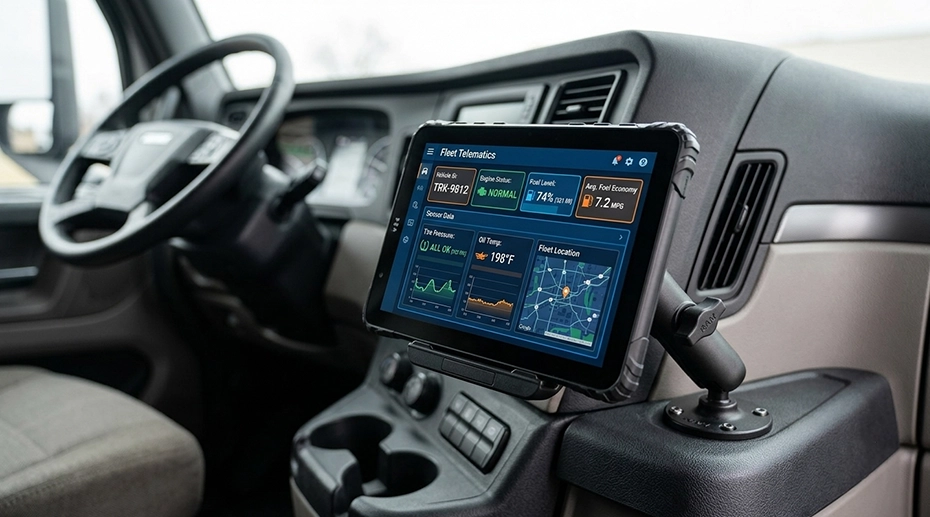
Table of Contents
Field Observation
Manual provisioning is the deployment phase most likely to create inconsistency — and the one that scales least with fleet size:
Technician fatigue after 20 devices → configuration errors increase
Devices shipped to remote depots must be provisioned on‑site or pre‑staged centrally
Each device handled by a technician is a device that could be dropped, misconfigured, or delayed
About the Author
TOPICON Hardware Engineering Team
Specialists in Android Enterprise deployment, zero-touch provisioning architecture, and large-scale fleet tablet rollout strategies for system integrators managing hundreds of devices across distributed vehicle fleets.
What Zero-Touch Enrollment Actually Means
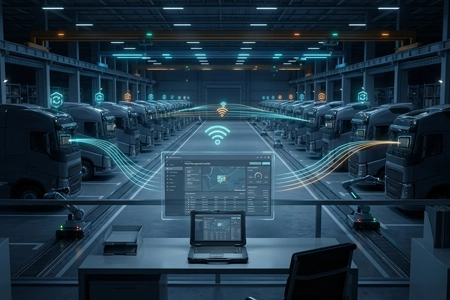
Zero-touch enrollment is not a synonym for "easy setup." It is a specific technical mechanism defined by Google's Android Enterprise program. A device that supports zero-touch enrollment has its unique hardware identifier — the IMEI or serial number — pre-registered with a zero-touch enrollment portal before the device is shipped. When the device is first powered on and connects to any internet connection — WiFi or cellular — it checks in with Google's zero-touch servers. The server recognises the device, identifies which MDM platform has been assigned to manage it, and redirects the device to that MDM server for enrollment. The device downloads its configuration profile, applies policies, installs required applications, and enters kiosk mode — all before the driver sees the home screen.
The technician never touches the device. The device can be shipped directly from the manufacturer to the deployment site — a depot, a vehicle upfitter, or a driver's home address. The driver unboxes the tablet, powers it on, connects to any available network, and the device configures itself. This is the critical distinction: zero-touch enrollment separates the physical logistics of hardware distribution from the IT task of device provisioning. The two processes no longer need to happen in the same location.
For fleet management hardware deployed across multiple depots, this separation eliminates the need to ship devices to a central IT location for provisioning, then re-ship them to the depots for installation. The device goes directly to its final destination. Provisioning happens over the air.
The Actual Enrollment Flow: From Unboxing to Fully Managed Device
Here is the sequence that provisioned the 150 tablets without a single technician touching any of them:
Pre-Shipment — Zero-Touch Registration. The system integrator provides a list of device IMEIs to TOPICON. These are registered in Google's zero-touch enrollment portal and assigned to the integrator's MDM server. The integrator configures the enrollment profile: which apps to install, which policies to apply, which kiosk mode configuration to use. This is done once, before any device ships.
Device Arrives at Depot. The tablet is unboxed by depot staff — not IT staff. It is inserted into its vehicle dock. The dock provides power. The tablet boots for the first time.
First Network Connection. The tablet connects to any available internet connection — the depot WiFi, a pre‑inserted SIM card with cellular data, or even a temporary hotspot. The specific network does not matter. The device only needs to reach Google's servers.
Zero-Touch Handshake. The device contacts Google's zero-touch server. The server identifies the device by IMEI, confirms it is registered, and redirects it to the TOPICON MDM server assigned during pre‑registration.
MDM Enrollment. The device connects to the MDM server and downloads its full configuration profile: Android Enterprise policies, kiosk mode settings, Managed Google Play app installations, WiFi credentials for the depot and route networks, custom programmable button mappings, and security restrictions.
Kiosk Mode Activation. The device reboots into kiosk mode with the whitelisted fleet applications already installed and configured. The driver sees the dispatch app, ELD app, and navigation app — nothing else. No setup wizard. No Google account sign‑in prompt. No app permissions dialogs.
Operational. The entire process — from first power‑on to fully configured kiosk mode — takes approximately 3–5 minutes depending on network speed and the number of applications being installed. Zero technician interaction.
This flow was executed 150 times simultaneously across three depots. The tablets were installed by vehicle upfitters who had no MDM training, no Android configuration knowledge, and no access to the MDM console. They inserted the devices into docks, powered them on, and walked away. The devices configured themselves.
▶ GMS provisioning — create Google account, apply policy, and enroll tablet
GMS vs AOSP: How Enrollment Differs Without Google Services
Google's zero-touch enrollment requires Google Mobile Services and the device's IMEI to be registered in Google's portal. For fleets deploying MDM‑ready rugged tablets without GMS — for example, in restricted government networks, defence applications, or environments where Google services are not permitted — the enrollment mechanism is different but the outcome is the same.
On AOSP devices, the tablet is pre‑configured at the factory or by the system integrator with the MDM server address and enrollment credentials stored in the device's factory partition. When the device boots for the first time, instead of contacting Google's servers, it contacts the TOPICON MDM server directly. The server recognises the device by its pre‑registered serial number, authenticates it, and pushes the full configuration profile. From the driver's perspective, the experience is identical to GMS zero-touch: power on, connect to any network, device configures itself.
The TOPICON MDM server supports both enrollment paths. The integrator chooses the path during the pre‑deployment configuration phase. Both produce the same result: a device that provisions itself without technician intervention.
Single Point of Failure
A manual provisioning process that requires a technician to handle every device is a single point of failure that scales linearly with fleet size. Every additional 100 devices adds 25 hours of technician time — and with it, fatigue, inconsistency, and scheduling bottlenecks. When a critical fleet deployment is delayed because the IT team cannot provision devices fast enough, the bottleneck is not the hardware supply chain. It is the provisioning process. Zero-touch enrollment removes this bottleneck entirely by decoupling device distribution from device configuration.
Frequently Asked Questions
Does zero-touch enrollment require the device to have a SIM card installed?
No. The device only needs an internet connection of any type. It can use WiFi, a pre‑inserted SIM card with cellular data, or even a temporary Ethernet connection through the dock. Once enrolled, the device can operate on any network the MDM policy permits. The enrollment process itself is network‑agnostic.
What happens if a zero-touch enrolled device is factory reset?
After a factory reset, the device repeats the zero-touch enrollment process on next boot. It contacts Google's servers, is redirected to the assigned MDM server, and re‑downloads its full configuration profile. The device returns to its managed state automatically. This prevents a driver from bypassing MDM by performing a factory reset — a common security concern with unmanaged devices.
Can I change the MDM server or configuration profile after devices have been enrolled?
Yes. The enrollment configuration — which MDM server the device reports to, which policies are applied — can be updated in the zero-touch portal. Changes take effect the next time the device checks in, which typically occurs on reboot or at a scheduled interval. The integrator is not locked into a specific MDM configuration once devices are deployed.
Does TOPICON support zero-touch enrollment for OEM deployments?
Yes. For OEM tablet projects, devices can be pre‑registered in the zero-touch portal under the system integrator's account before shipment. The integrator controls the enrollment profile — branding, apps, policies, kiosk mode configuration — while TOPICON handles the hardware and zero-touch registration. The device arrives at the end customer already configured to enroll into the integrator's MDM infrastructure.
Deploying 100+ Fleet Tablets? The Provisioning Process Should Not Be the Bottleneck.
Zero-touch enrollment provisions devices over the air — no technician, no USB cable, no manual setup. Devices ship directly to their deployment location and configure themselves on first power‑on. GMS and AOSP enrollment paths are both supported through the TOPICON MDM server.
Related Provisioning & MDM Resources