How to Integrate Barcode, RFID, and LoRa with Fleet Tablets – A System Integrator's Guide
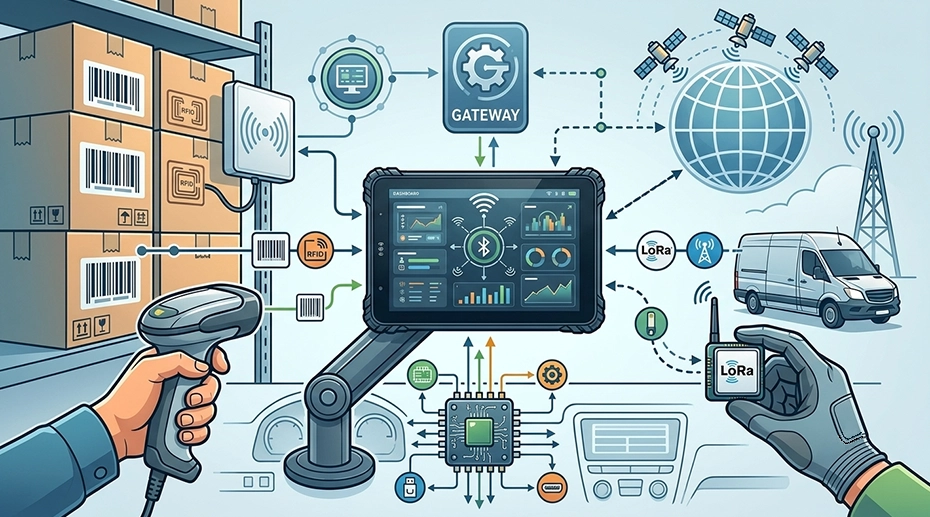
Adding a barcode scanner to a fleet tablet sounds simple: pick a module, attach it, configure the app. But when you're deploying across warehouses, delivery vans, and field service teams — each with different scanning distances, tag types, and connectivity requirements — the peripheral integration layer becomes its own engineering project. Here's what system integrators need to know before specifying barcode, RFID, and LoRa modules for vehicle-mounted computing deployments.
Field Experience
Across fleet and industrial deployments, peripheral integration decisions typically come down to three questions:
What's the scanning distance and environment?
Does the peripheral attach through the dock, or directly to the device?
About the Author
TOPICON Fleet Deployment Team
Hardware engineering specialists supporting system integrators with peripheral module selection, integration architecture, and deployment planning for barcode, RFID, and LoRa across fleet, warehouse, and field service applications. Start your custom integration project →
Table of Contents
Part 1: Barcode Scanner Integration
Barcode scanning is the most common peripheral requirement in fleet and logistics deployments. But "we need barcode scanning" is not a specification — it's the start of a set of engineering decisions that affect scan speed, accuracy, and operator workflow. The right scanner engine integrated with industrial tablets built for data capture can mean the difference between a smooth operation and constant workflow interruptions. Deploy fleet-ready tablets with integrated scanning →
1D vs 2D Scanner Engine: Which One for Which Job?
Not all barcodes are the same, and neither are the scanner engines that read them. Selecting the wrong type means missed scans, frustrated operators, and workflow bottlenecks — especially in warehouse environments where scanning speed directly impacts throughput. Equip your mobile data terminals with the right scanner →
Recommendation for fleet deployments: Choose a 1D/2D imager unless the application specifically requires long-range laser scanning. The ability to read QR codes, damaged barcodes, and screen-based barcodes covers nearly all fleet and logistics workflows in a single scanner engine. For deployments that combine barcode scanning with RFID identification, a dual-capability module can reduce device count. Configure an in-vehicle terminal with integrated scanning →
How the Scanner Connects: Two Integration Paths
Barcode scanners connect to fleet tablets through one of two paths — and the choice has implications for reliability, ergonomics, and deployment architecture. This is particularly relevant for fleet management hardware platforms where the device serves dual roles as both a vehicle terminal and a handheld tool.
Path A: Via Docking Station
The scanner module is integrated into the vehicle docking station. When the tablet is docked, it has barcode scanning capability. When undocked, it does not — unless the tablet has a separate integrated scanner. This architecture makes sense for forklifts, warehouse vehicles, and fixed workstations where scanning always happens in or near the vehicle. The vehicle-mounted docking system handles power delivery to the scanner, eliminating battery concerns. Spec a vehicle mount terminal with dock-based scanning →
Path B: Direct to Device
The scanner module attaches directly to the tablet as an expansion module. Scanning capability stays with the device whether it's docked or handheld. This architecture fits delivery drivers, field service technicians, and any workflow where scanning happens away from the vehicle. For example, tablets built for last-mile delivery operations often require handheld barcode scanning at every stop — something a dock-based scanner alone can't provide. TOPICON MDT865, MDT880, MDT1065, and MDT1080 support direct-attach barcode modules for this deployment model.
Part 2: RFID Reader Integration
RFID integration is more complex than barcode — not because the technology is harder, but because the frequency, protocol, and read range must be matched to the specific use case. A UHF RFID setup for warehouse pallet tracking is fundamentally different from an HF RFID setup for equipment inspection. System integrators deploying vehicle-mounted data terminals for industrial environments need to evaluate RFID options based on the physical environment where tags will be read. Get a custom RFID integration quote →
RFID Frequency Selection: UHF vs HF vs LF
Recommendation for fleet integrators: If you're tagging assets that stay in the vehicle (tools, equipment), HF is usually sufficient. If you're tracking items moving through a yard or warehouse, UHF is the standard. If the tags will be attached to metal surfaces (engine parts, hydraulic components), LF is the only reliable option. TOPICON MDT platforms support all three frequencies via modular RFID readers — configured at the dock level for vehicle-mounted use, or as direct-attach modules for handheld operation. For an overview of how these modules integrate with our rugged computing platform, see our hardware architecture documentation.
RFID Integration Architecture: Dock-Based vs Device-Based
Dock-Based RFID
The RFID reader is integrated into the vehicle docking station. Tags are read when items are brought near the dock — for example, scanning a pallet loaded onto a forklift, or checking a driver ID tag when entering the vehicle. Reader power is supplied by the vehicle, and the antenna can be larger and more powerful than a portable module. This is the preferred architecture for forklift-mounted tablet systems where the vehicle itself moves through tag-dense environments.
Best for: Forklift-mounted inventory, vehicle access control, fixed checkpoint scanning
Device-Based RFID
The RFID reader attaches directly to the tablet as an expansion module. The operator carries the tablet to the asset — scanning equipment tags during maintenance rounds, reading student RFID badges at school bus doors, or checking tools in and out of a mobile service truck. The tablet stays with the operator, not the vehicle. This model aligns with tablets designed for transportation and public transit where passenger or student identification happens at entry points away from the driver's seat.
Best for: Field service inspection, school bus student tracking, mobile asset verification
Part 3: LoRa Module Integration
LoRa (Long Range) fills a specific gap in fleet communications: low-bandwidth, long-range data transmission where cellular coverage is unreliable or too expensive for the data volume. It's not a replacement for 4G/5G — it's a complementary channel for sensor data that needs to travel kilometers, not meters, on minimal power. For telematics hardware deployed in remote fleet operations, LoRa provides a critical backup data path when vehicles operate beyond cellular range. Build a LoRa-integrated tablet solution →
Where LoRa Makes Sense in Fleet Deployments
Remote Sensor Telemetry
Temperature monitors in refrigerated trailers. Fuel tank level sensors at remote depots. Soil moisture probes in agricultural fields. LoRa transmits small data packets over 5-15 km without cellular infrastructure or subscription costs. The tablet acts as the LoRa gateway — collecting sensor data and uploading it via cellular when in coverage. This architecture is increasingly common in GPS tracking and telemetry systems that combine real-time location with environmental sensor data.
Off-Network Fleet Communication
Mining sites, remote construction projects, and offshore platforms where cellular coverage is patchy or nonexistent. Vehicles equipped with LoRa modules can exchange status updates, location pings, and alert messages without any carrier infrastructure — creating a private, license-free mesh network. Computing hardware built for heavy construction environments often relies on LoRa to maintain communication between equipment spread across large job sites.
Yard & Depot Asset Tracking
Trailers, containers, and equipment parked in large yards. LoRa tags on each asset transmit location and status periodically. A tablet in a yard truck or at a fixed gateway collects the data. Much lower cost than active GPS trackers for assets that only need periodic updates — a practical complement to dedicated vehicle tracking solutions.
LoRa Module Selection: Key Specifications
See Barcode & RFID Modules in Action
MDT865 with expansion modules — same tablet, different peripheral configurations
Barcode Scanner Module
MDT865 with metal bracket and barcode scanner — warehouse and logistics
RFID LF Reader Module
MDT865 with integrated LF RFID — asset tracking and access control
Integration Decision Summary
Frequently Asked Questions
Can the same tablet support barcode, RFID, and LoRa simultaneously?
It depends on the architecture. Via a docking station: yes — the dock can integrate barcode and RFID modules while the tablet's expansion port supports LoRa. On a standalone tablet without a dock: the device typically supports one or two direct-attach modules. For deployments requiring all three simultaneously, a dock-based architecture provides the most peripheral channels. Configure your multi-module tablet solution →
Which RFID frequency should I choose for metal-surface asset tracking?
LF (125 kHz) is the only RFID frequency that reliably reads tags attached to metal surfaces. UHF and HF signals reflect off metal, creating read dead zones. If your assets are metal — engine parts, hydraulic components, tools — specify LF RFID from the start. Retrofitting from UHF to LF after deployment is significantly more expensive than selecting the right frequency initially. Tablets designed for field inspection workflows often integrate LF RFID for exactly this reason.
Is LoRa a replacement for cellular connectivity in fleet tablets?
No. LoRa is designed for low-bandwidth sensor data — tens of bytes per transmission, not megabytes. It cannot replace cellular for navigation, video streaming, ELD data upload, or fleet management application traffic. Think of LoRa as a complementary channel: cellular handles the heavy data, LoRa collects sensor telemetry from remote locations where cellular is unavailable or too expensive for the data volume.
Does TOPICON provide SDK support for custom barcode and RFID integration?
Yes. TOPICON provides SDK and API documentation for barcode scanner control, RFID reader configuration, and LoRa module data handling — enabling system integrators to build custom workflows that integrate scanning and identification directly into their fleet management or logistics applications. Contact our integration engineering team →
Planning Barcode, RFID, or LoRa Integration for Your Fleet?
TOPICON provides rugged MDTs with dock-based and device-based peripheral integration — barcode scanners, RFID readers, and LoRa modules — with SDK/API support for system integrators.
Related Integration & Deployment Resources